Mortivius

All receipts

Receipt № 227Verified

Mortivius is a Gnome.

GnomeOfficialreceipt № 227

Read straight from a current value of its record keeper.

Status

Verified. Checked against the record, and it holds.

What a reader must know

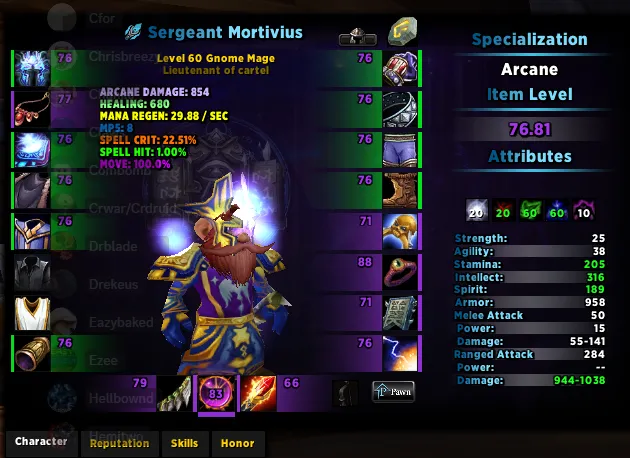
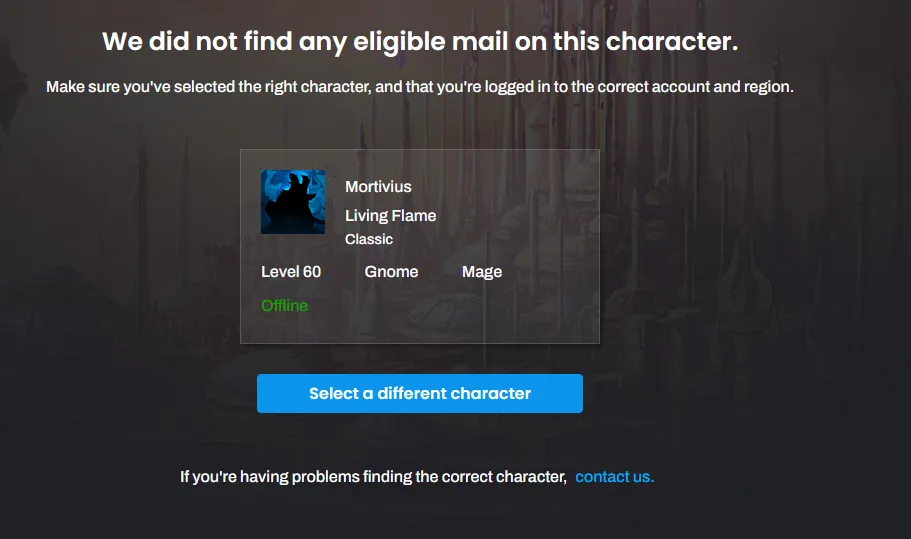
Read from Blizzard's API (his pull of 2026-10-11): Season of Discovery Mortivius on Crusader Strike, Mage 60, Alliance, race Gnome. Its character id there, 52448050, is the one Warcraft Logs records as his actor's guid. WCL's API doesn't expose race. Dated captures agree: his in-game character pane, 2025-01-14 (UTC): "Sergeant Mortivius", "Level 60 Gnome Mage", "Lieutenant of cartel"; specialization Arcane, item level 76.81; Blizzard's mail recovery page, 2024-09-22 (UTC): "Mortivius", "Living Flame", "Classic", "Level 60", "Gnome", "Mage".

What it ranks against

Character
Mortivius

The saved snapshot

the API data this claim rests on

Download the raw snapshot

Screenshots

a dated capture that agrees (captured)
a dated capture that agrees (captured) · Cut to the page; nothing inside it was changed.
a dated capture that agrees (captured)
Receipt

    Keyboard shortcuts

    Anywhere

    /
    Search. On the Receipts page it goes to that page's filter.
    CtrlKor⌘K
    Search, from any page.
    Esc
    Close what's open: the search, a receipt, a screenshot, the chapters or this list.
    ?
    This list.

    In the search

    ↑↓
    Move through the results.
    Enter
    Open the one picked.

    A receipt, open

    ←→
    The receipt before, and the next, in its group.

    The Run and The Race

    ←→↑↓
    Move between bosses and raids, once the map of bosses has focus (Tab reaches it).
    Esc
    Let go of a boss you picked.
    Space
    Stop a replay that's playing. Any key that scrolls the page does.

    The Walk-off

    With the board's dates in focus.

    ←→
    The board on the date before, or the one after.
    HomeorEnd
    The first date, or the last.

    The Statue

    With the statue in focus.

    ←→
    Turn it a step.
    Shift←orShift→
    Turn it further.
    Page UporPage Down
    Turn it to its next side.
    Home
    Back to the view it opened on.

    Gallery

    With a screenshot open.

    ←→
    The one before, and the next.